100% Serverless & Local Wi-Fi

Revive Your Bose SoundTouch Speakers

Bose deprecated SoundTouch cloud servers, leaving features unsupported. BOSOTOCO brings back multi-room audio, 30,000+ radio stations, custom presets, and stereo pairing directly through your local Wi-Fi network.

BOSOTOCO

A COMPANION FOR BOSE SOUNDTOUCH

📻 PLAY RADIO

Direct UPnP streaming to Bose Hardware without external cloud servers.

🎛️ PRESET BUTTONS (1 - 6)
1
2
3
4
5
6
🔊 MULTI-ROOM AUDIO ZONES

Sync all speakers with one tap using the "PLAY ALL" global command.

🎵 SPOTIFY FREE & PREMIUM

Supports playback for both Spotify Free and Spotify Premium tiers without complex setup or API configuration.

Zero Firmware Hacks

Works safely out of the box without altering speaker firmware.

Zero Configuration

Auto-discovers speakers on launch using high-speed mDNS scanning.

One-time € 5,00 Purchase

Includes lifetime updates with no in-app purchases or hidden fees.

Designed for Audiophiles

Powerful Capabilities Restored

Everything you need to manage complex multi-speaker setups across your entire home effortlessly.

Auto Discovery

Instantly binds to all Bose SoundTouch hardware on your Wi-Fi network upon app launch.

  • Network Service Discovery (NSD)
  • SSID Target Locking
  • Background status refresh

Multi-Room Audio Zones

Group multiple speakers into unified zones or sync the entire house with a single button.

  • Master/Slave Architecture
  • One-tap "Play All" global sync
  • Proportional volume scaling

30,000+ Radio Stations

Search and stream global radio directly using high-fidelity UPnP/DLNA protocols.

  • Radio-browser integration
  • Direct-to-hardware playback
  • High-res artwork & favicons

Hardware Preset Sync

Mirror and control the 6 physical preset buttons on your Bose SoundTouch speakers.

  • Global preset push
  • Remote override & clear
  • Direct AAC/MP3 stream mapping

True L/R Stereo Pairing

Pair two identical SoundTouch units as dedicated left and right audio channels.

  • Permanent pair persistence
  • Instant channel swapping
  • Mono dissolve controls

PIN Security & Setup

Protect critical settings from guests or configure brand new hardware easily.

  • 4-Digit PIN protection
  • Wi-Fi credential pushing
  • Remote hardware renaming
Jetpack Compose UI

Designed for Speed & Clarity

Take a tour of the application screens and native control interfaces.

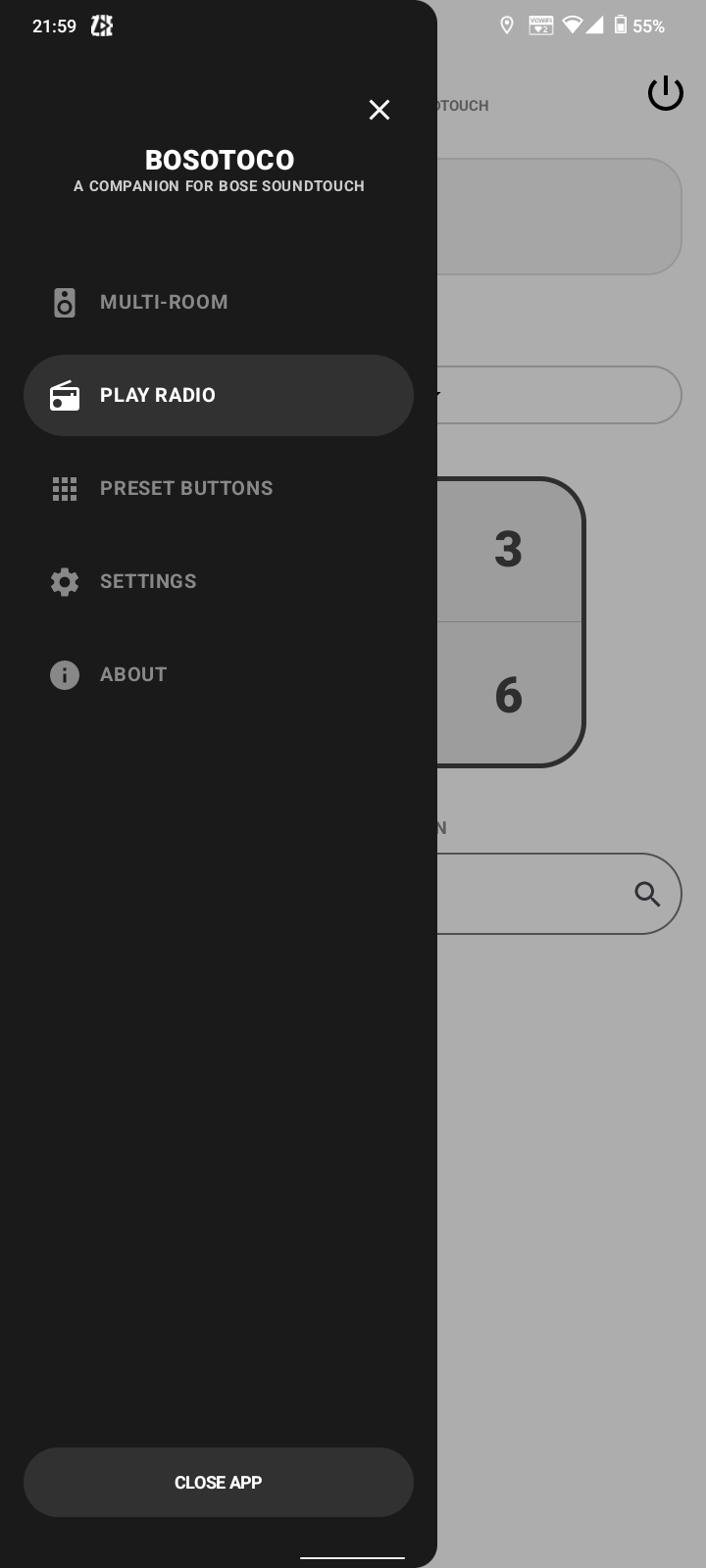
Navigation & Menu

Access Multi-Room, Radio Hub, Presets, Settings, and Global Power Off instantly.

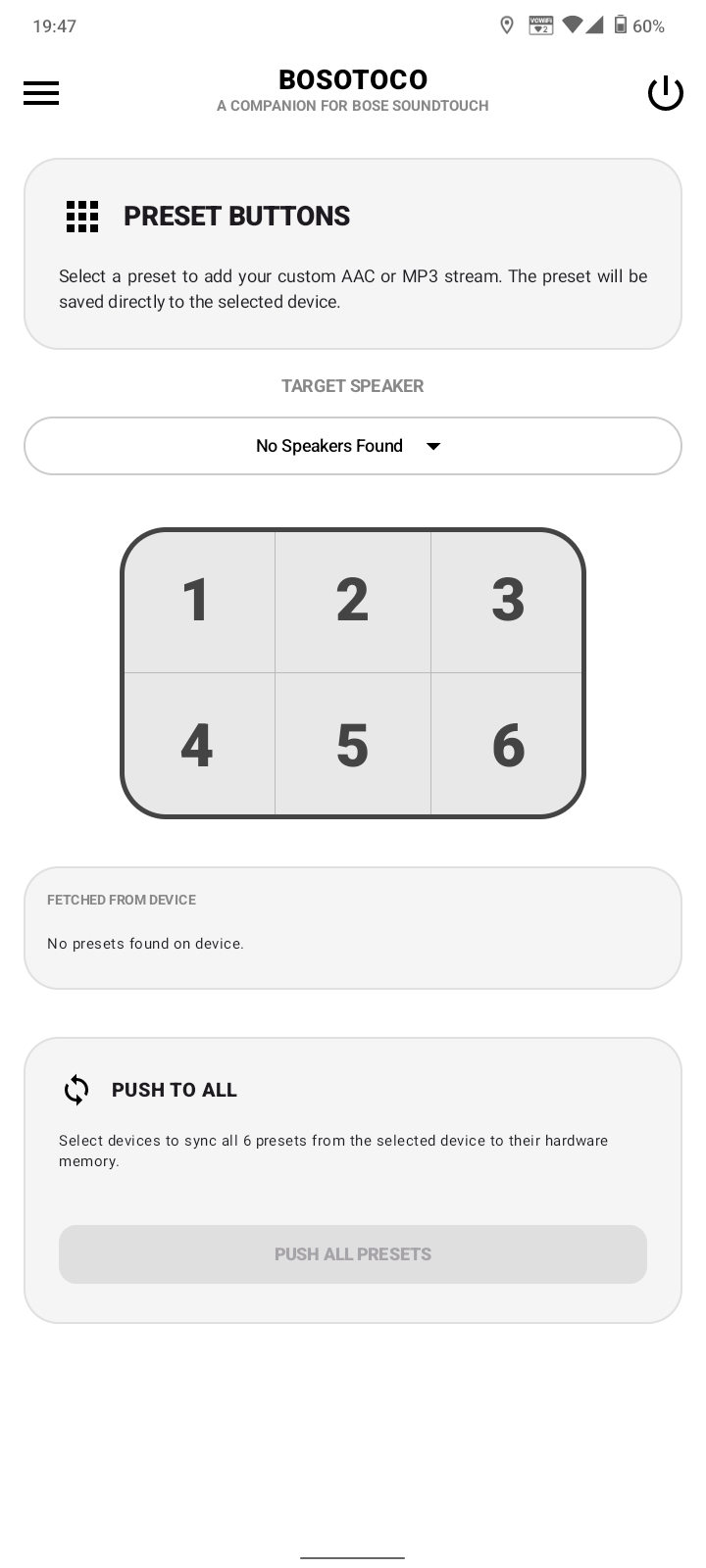
Preset Buttons (1 - 6)

Manage and push custom streams directly into the physical buttons on your speakers.

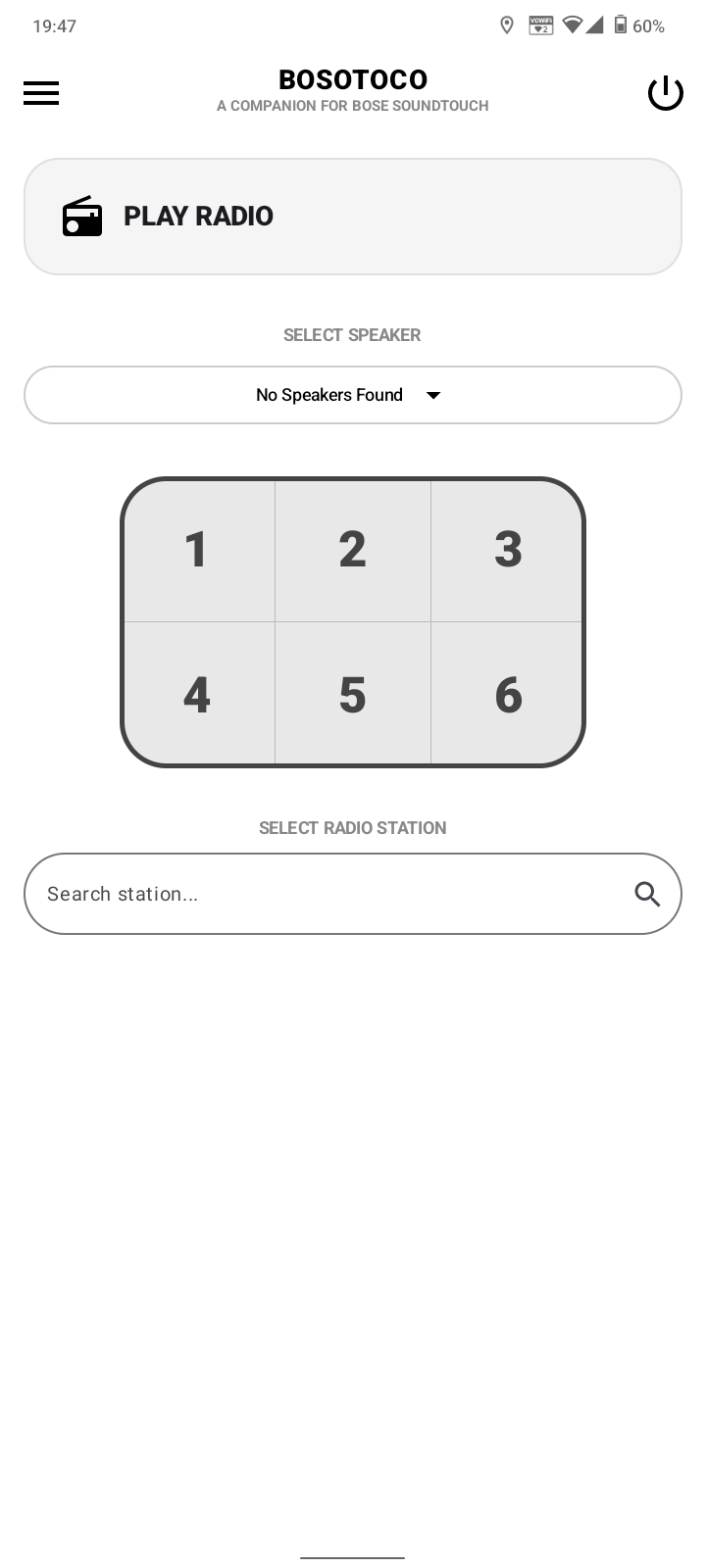
30,000+ Radio Hub

Search stations globally and stream directly over local UPnP protocols.

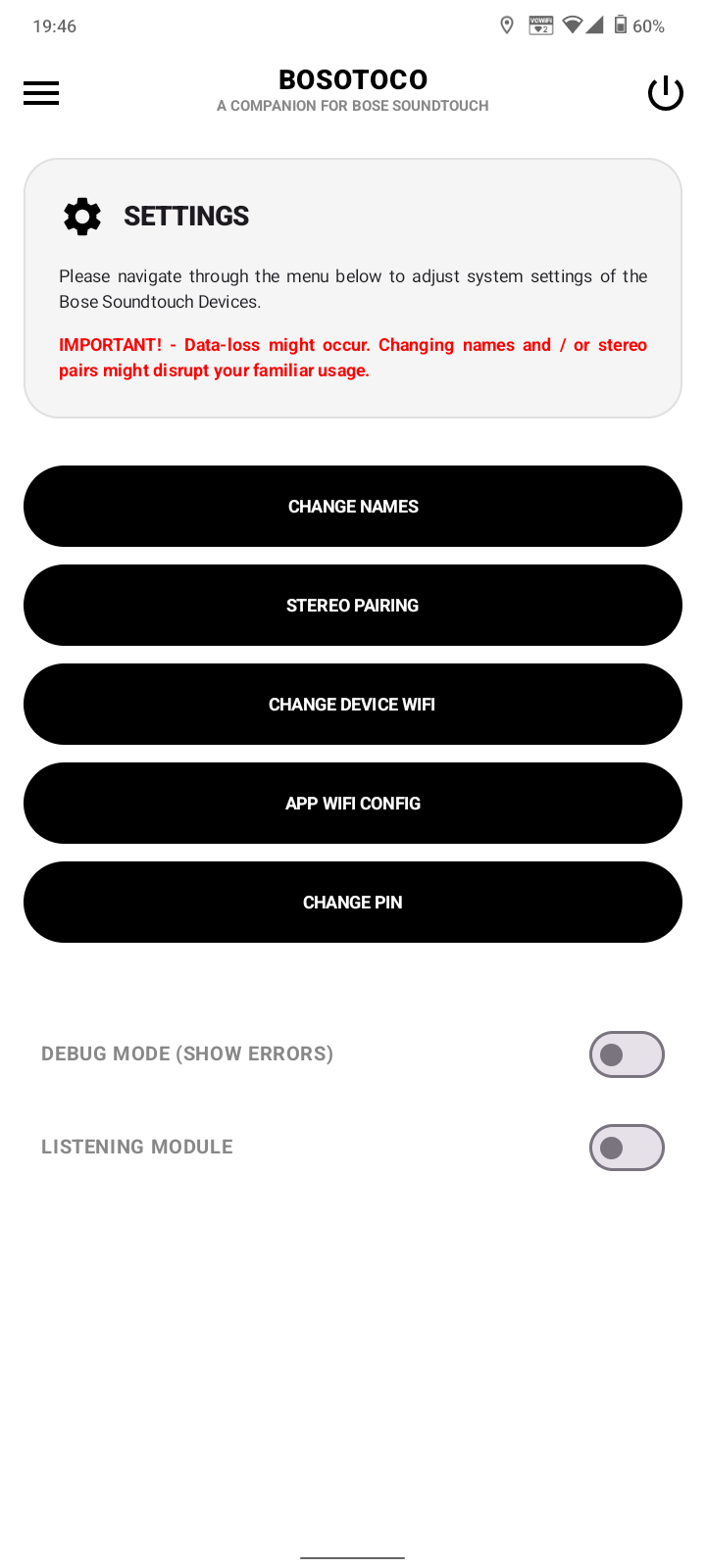
System Settings & PIN

Lock configurations behind a 4-digit PIN to prevent accidental changes.

BOSOTOCO Navigation Menu Preset Buttons Screen Radio Hub Screen Settings Screen
Definitive Guide

User Manual & Quickstart

Everything you need to know about setting up and running your BOSOTOCO companion suite.

BOSOTOCO requires zero cloud account registration or manual IP configuration.

  1. Ensure your Android device is connected to the same Wi-Fi network as your Bose SoundTouch speakers.
  2. Launch the BOSOTOCO app. The app automatically scans for _soundtouch._tcp services via mDNS.
  3. Your speakers will appear as cards on the main Device Pager screen. Active speakers playing music will automatically be highlighted.

Create synchronized multi-speaker zones across your entire house in real time:

  • Create Zone: Select your Master speaker, tap the + / Link icon next to any available speaker to sync audio.
  • Play All: Tap the large PLAY ALL button at the bottom of the main screen to group all speakers in your home instantly.
  • Proportional Volume: Adjusting the master volume automatically scales group volume while preserving relative ratios.

Access tens of thousands of global stations and assign them directly to your hardware buttons:

  • Go to Play Radio in the side drawer menu.
  • Search for any station by name, genre, or country.
  • Select a target speaker and map the stream to any preset slot (1 through 6).
  • Use Sync All / Push to All to push all 6 presets across every speaker in your household simultaneously.

Pair two identical speakers (e.g., two SoundTouch 10s) as a dedicated L/R stereo pair:

  1. Open Menu > Settings. Enter your security PIN (Default: 0000).
  2. Select Stereo Pairing.
  3. Choose your Left and Right speakers, then tap Pair. The app will save this persistent L/R configuration.

Manage hardware power and secure critical settings:

  • Power Off: Tap the Power icon in the top right header to send a standby command to all network speakers.
  • Auto-Exit: Check "Also close the App" to close BOSOTOCO after turning off all hardware.
  • PIN Lock: Prevent accidental changes by changing the 4-digit PIN in Settings > Change PIN.
Architecture

Technical Specifications

Built with modern Android engineering standards for maximum stability and local network efficiency.

UI & Framework
Kotlin, Jetpack Compose, Material 3
Asynchronous Architecture
Kotlin Coroutines & Kotlin StateFlow
Protocols Used
UPnP / DLNA (AVTransport), mDNS / NSD, SoundTouch WebServices API
Networking Stack
Retrofit, OkHttp3, XML Parser
Android Permissions
INTERNET, ACCESS_WIFI_STATE, FINE_LOCATION (SSID Scan)
Diagnostic Suite
Raw XML Inspector, Real-time HUD Debug Terminal
Got Questions?

Frequently Asked Questions

No, the app is to be purchased from the Google Playstore for € 5,00. This includes lifetime updates. There are no in-app purchases or hidden fees. The app comes with all of its functionality included upfront.

Yes, you can listen to radio for free. Our App uses the radio-browser.info API to search for radio stations Worldwide. With over 30,000+ radio stations, we cannot think of any station left out.

Yes, you can set / save your presets to your physical devices by using the BOSOTOCO App. You can even push your presets from one device to another (or all just at once). Your physical presets work as long as you have the BOSOTOCO App installed on your phone.

No, we are not tracking you. By Google Play Terms & Conditions, as well as the Privacy Notice, it is not allowed to have background tracking available without letting you know. We use location, notification, and Wi-Fi permissions strictly to enable the app's functionality.

At the moment we only support English. Despite the fact we understand its fairly easy to add different languages, we want to make sure our app is fully functional across all Android devices before adding different languages. Our app is very intuitive, and you will quickly get the hang of it!

Yes, feel free to send a message to bosotoco@jimmyboy.nl. We will get back as soon as possible. Make sure to include screenshots and / or copies from the LISTENING MODULE, which shows device activity. Keep in mind, these logs include internal network information (like local IP addresses).

No, we are not selling any information gathered from the App nor information sent as a support ticket. The App is not sending or storing any information from you, nor your devices outside your phone besides the storing of presets on the SoundTouch devices.

No. BOSOTOCO operates completely over your local Wi-Fi network using standard Bose WebServices APIs and UPnP protocols. It does not flash, root, or alter speaker firmware in any way.